Experimental
Wiring and pin configuration
Canonical source: openamr-platform-hw/electrical/wiring/wiring-pinout.md
Applies to: the documented OpenAMRobot reference mobile base; verify repository revision before changing hardware or firmware.
Experimental project documentation
These instructions describe the current reference build and its measured behavior. Use physical safeguards, test with wheels clear of the floor, and revalidate after changing parts, wiring, firmware, battery chemistry, or geometry.
Last updated: 2026-06-19.
Convention: MOTOR1 = LEFT wheel, MOTOR2 = RIGHT wheel. Logic level 3.3 V.
Verification status (2026-06-19): full wiring/component audit done. Physically verified — drivers + motors (ZBLD C20-120L2R + ZD Z4BLD60-24GN-30S, both drivers identical), encoders (AS5040; the 5 V→~4 V overvoltage was fixed → now 3.3 V, see encoders.md), IMU (MPU-6500, SDA18/SCL19, 3.3 V, 0x68), Teensy = 4.0 (i.MX RT1062), power/24 V (no fuse / no battery cut-off — see power.md). Component list + datasheets: components-bom.md. Still to read (completeness): LiDAR model sticker, DC-DC model, AC/DC converter, gearbox suffix. (Pi RAM confirmed 8 GB, 2026-07-06 — see raspberry-pi.md.)
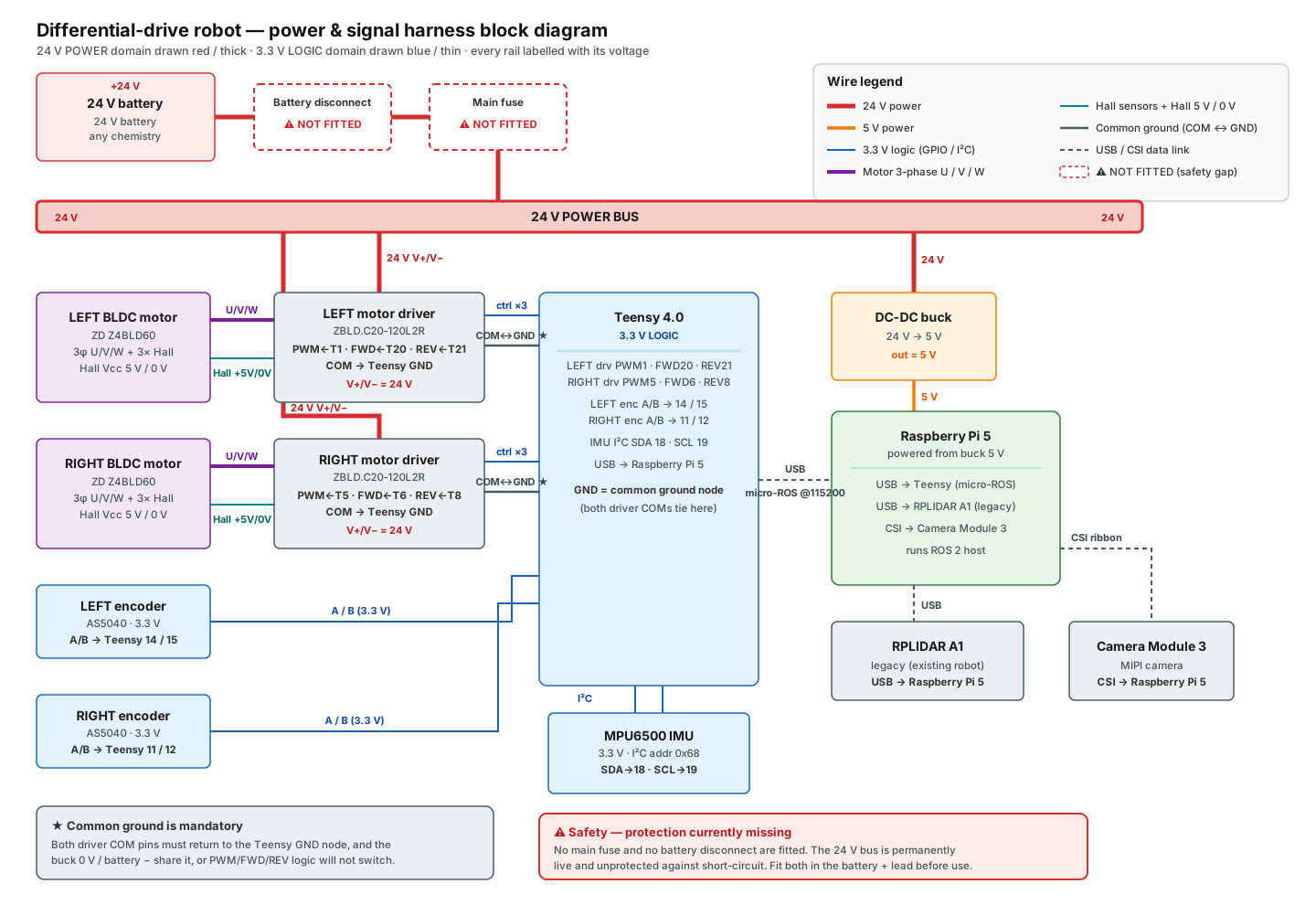
The complete power-and-signal wiring is shown in the harness diagram below; the sections that follow give the exact pin/terminal tables behind it.
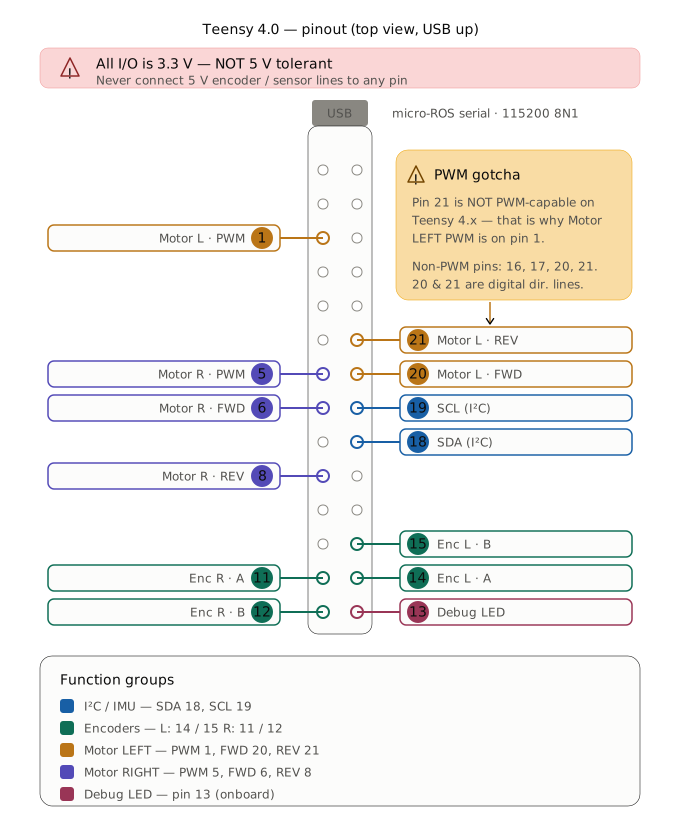
Teensy 4.0 pin assignment
| Function | Pin | Notes |
|---|---|---|
| IMU SDA | 18 | I²C data (MPU6500 @ 0x68) |
| IMU SCL | 19 | I²C clock |
| Encoder LEFT (M1) A | 14 | quadrature |
| Encoder LEFT (M1) B | 15 | quadrature |
| Encoder RIGHT (M2) A | 11 | quadrature |
| Encoder RIGHT (M2) B | 12 | quadrature |
| Motor LEFT (M1) PWM | 1 | → driver VAR/AI2 (speed) |
| Motor LEFT (M1) IN_A / FWD | 20 | → driver FWD/DI1 |
| Motor LEFT (M1) IN_B / REV | 21 | → driver REV/DI2 |
| Motor RIGHT (M2) PWM | 5 | → driver VAR/AI2 (speed) |
| Motor RIGHT (M2) IN_A / FWD | 6 | → driver FWD/DI1 |
| Motor RIGHT (M2) IN_B / REV | 8 | → driver REV/DI2 |
| Debug LED | 13 | init/status (3 blinks = init failure) |
| micro-ROS | USB | native serial, 115200 baud |
These values are the firmware's pin configuration — see
openamr-platform-fw. Note:MOTOR1_PWMis pin 1 (pin 21 is not a PWM pin on the Teensy 4.x — a common upstream pitfall).
The same assignment is shown as a physical pin map below.
Driver wiring — ZBLD C20-120L2R (VERIFIED 2026-06-19)
Both drivers are wired identically (only the Teensy pins differ). The signal terminal block has 12
positions; exactly 4 are connected per driver (read off the board: x=wired, o=empty, from FWD):
FWD/DI1  REV/DI2  JOG/DI3  CLR/DI4  BRK/DI5  COM  VAR/AI2  +5V  ERR/DO1  SPD/DO2  A+  B-
   x        x        o        o        o      x      x      o      o        o     o   (o)
| Driver terminal | Role | ← Teensy LEFT (M1) | ← Teensy RIGHT (M2) |
|---|---|---|---|
VAR/AI2 |
speed setpoint, analog 0–5 V (Teensy PWM @3 kHz, filtered) | PWM 1 | PWM 5 |
FWD/DI1 |
forward direction (digital) | IN_A 20 | IN_A 6 |
REV/DI2 |
reverse direction (digital) | IN_B 21 | IN_B 8 |
COM |
common ground — mandatory | GND | GND |
The driver's connected terminals and their Teensy links are shown below.
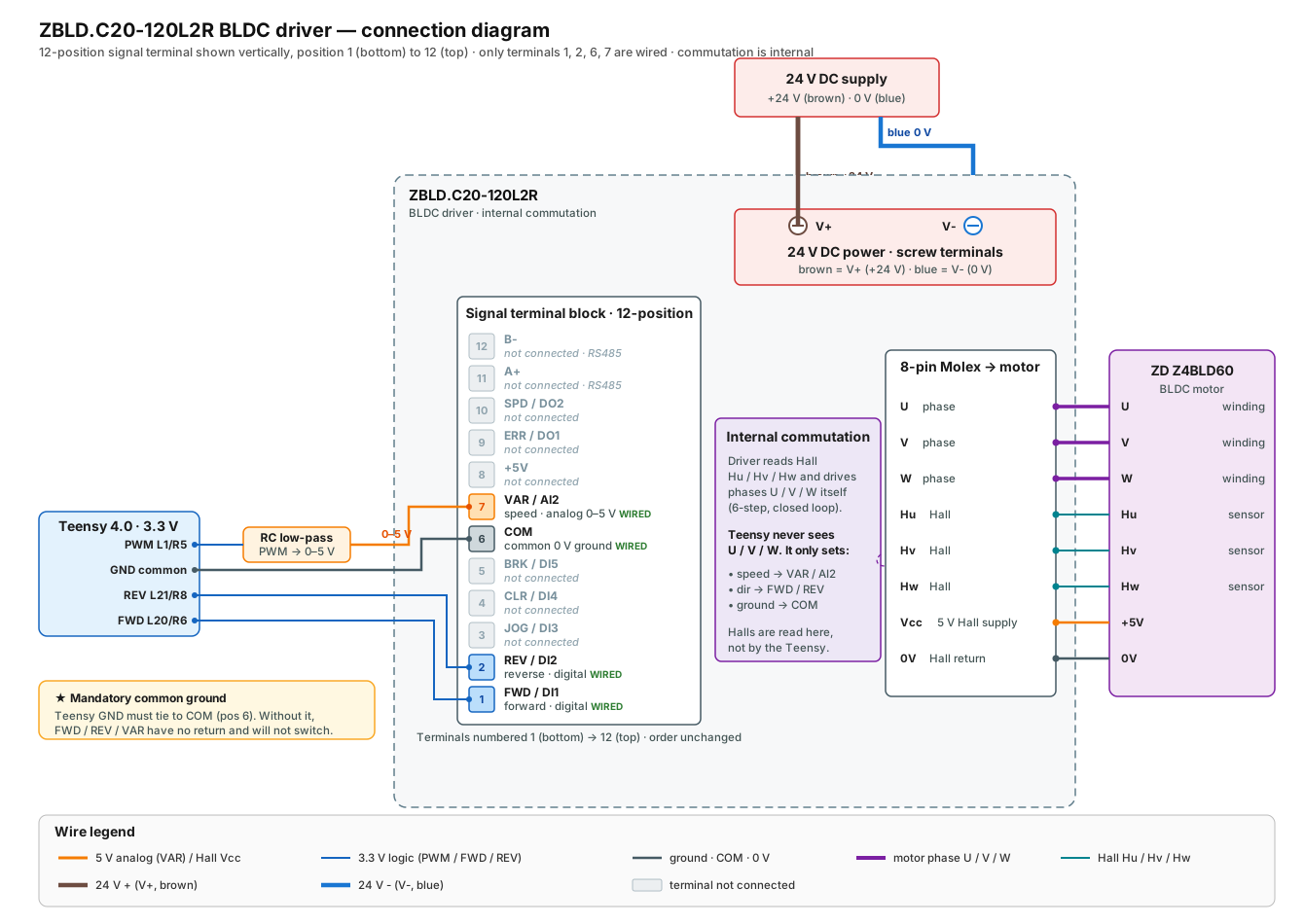
Unused: JOG/DI3, CLR/DI4, BRK/DI5 (brake), +5V, ERR/DO1 (no fault read-back), SPD/DO2
(no speed feedback to the Teensy), A+/B− (RS485 not used). Speed/gain is set by the on-board VAR/AI1
pot + ACC/DEC ramp pot (see motors-drivers.md).
⚠️ The Teensy uses the
USE_GENERIC_2_IN_MOTOR_DRIVERprofile (PWM + INA + INB). On this BLDC driver that maps cleanly: PWM→speed (VAR/AI2), INA→FWD/DI1, INB→REV/DI2. The driver does its own commutation from the Hall sensors — the Teensy never sees U/V/W.
DIP switches (config applied 2026-06-19, identical both drivers)
| SW1 | SW2 | SW3 | SW4 | SW5 | SW6 |
|---|---|---|---|---|---|
| OFF | ON | OFF | ON | ON | OFF |
The switch positions are shown below.
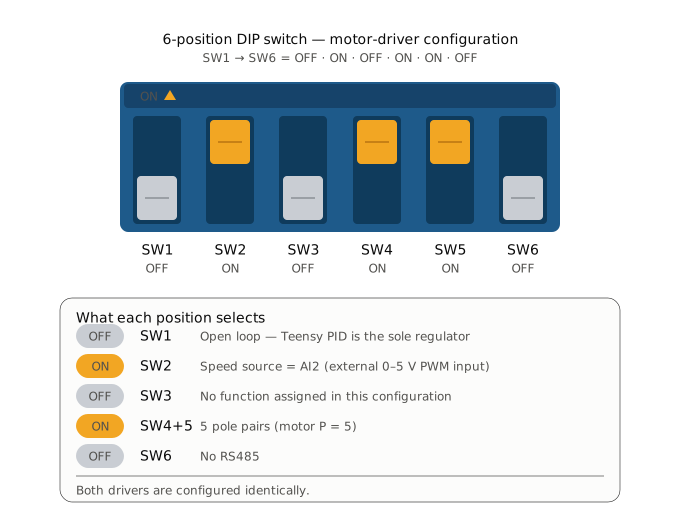
- SW1 = OFF → open loop (driver is a power stage; the Teensy PID is the sole regulator — best for this robot, removes the double loop). Was ON (closed loop); changed 2026-06-19. Validated: smooth.
- SW2 = ON → speed source = AI2 (the external 0–5 V input where our PWM arrives). Must stay ON.
- SW4 = ON, SW5 = ON → 5 pole pairs (motor is P=5). Was OFF/OFF (=2 pp, wrong); corrected. Irrelevant in open loop but set correctly for future closed-loop use.
- SW6 = OFF (no RS485). See the full rationale in motors-drivers.md.
- ⚠️ With SW2=ON (AI2 source), the VAR pot is inert for balancing — speed comes from the PWM, not the pot. The residual ~9 % open-loop L/R asymmetry is handled by the Teensy PID (→ ~0.2 %).
Motor wiring (per motor) — VERIFIED 2026-06-19
Driver power: V+ / V− = 24 V DC (大 screw terminals, bottom-right, 电源DC24V), fused.
⚠️ DC power wire colours on THIS robot (confirmed 2026-06-18, counter-intuitive — AC-style colours on a DC bus): brown = + (V+, i.e. the DC "red"), blue = − (V−, i.e. the DC "black"). Colour is only a presumption — verify with a multimeter before connecting a 24 V lead. See power.md.
Driver motor connector (white Molex, 8 pins):
U |
V |
W |
Hu |
Hv |
Hw |
Vcc |
0V |
|---|---|---|---|---|---|---|---|
| phase U | phase V | phase W | Hall U | Hall V | Hall W | +5 V (Hall supply) | GND (Hall) |
🔧 Left-wheel blocker: the left signal wiring (4 terminals above) is proven healthy, so the intermittent left wheel is NOT here — it's on the 24 V power (V+/V−) or the motor connector (a phase or the Molex). That's where to chase the faux-contact (continuity test while flexing). See the
openamr-platform-swtroubleshooting doc (docs/troubleshooting/diagnostics.mdin that repo) and theamr-left-wheel-faux-contactmemo.
Grounding
All grounds must be common: Teensy GND ↔ driver COM. A floating COM was a real source of noise
concern (see the openamr-platform-sw troubleshooting doc (docs/troubleshooting/diagnostics.md in that repo)).
ASCII map
                 Teensy 4.0 (3.3V)
   IMU  ── SDA18/SCL19 ───────────────► MPU6500 (I2C 0x68)
   ENC L ── A14/B15 ──────────────────► encoder LEFT
   ENC R ── A11/B12 ──────────────────► encoder RIGHT
   M1   ── PWM1 / IN20 / IN21 ────────► driver LEFT  ── U/V/W ─► motor LEFT
   M2   ── PWM5 / IN6 / IN8 ──────────► driver RIGHT ── U/V/W ─► motor RIGHT
   USB ───────────────────────────────► Raspberry Pi (micro-ROS 115200)
   GND ───────────────────────────────► COM of both drivers (common)
Schematic to understand how Emergency switch and reset button works.
E-Stop button and Power distribution - OpenAMRobot discussions
Schneider (genuine, ~€20–35):
Harmony XB4-BS542 — Ø22 mm mount, red Ø40 mm mushroom, twist-to-release, metal bezel, 1NC (add a ZBE-102 block for a second NC channel). Certified positive-opening contacts per IEC 60947-5-5 — the one to use for anything CE-facing. → https://www.se.com/ww/en/product/XB4BS542/ Plastic-bezel equivalent: XB5-AS542, same page structure at se.com.
Chinese clone (~€1–5):
XB2-BS542 — same Ø22/Ø40 form factor, 1NC, twist release, 10 A Ith, IP65, IEC 60947-5-1, but no e-stop-specific certification. Fine for prototypes and internal testing. → https://www.amazon.com/XB2-BS542-Emergency-Button-Switch-pushbutton/dp/B07Y7KZDSH → direct from manufacturer, ~$1/pc: https://www.finglai.com/products/switches/push-buttons/DIA22-XB2-B/XB2-BS542.html LAY37 is the same class, usually sold as NO+NC: https://www.amazon.com/LAY37-Mushroom-Emergency-Button-Switch/dp/B07DL333VL eBayElectric-b2c
Reminder: contacts are ~3 A DC-13 at 24 V, so for the OpenAMRobot battery bus, break a contactor coil with the NC contacts rather than the full motor current.
Engineering handoff
- Record the repository commit, hardware revision, supply voltage, and test configuration with every result.
- Stop if observed wiring, component labels, geometry, or topic behavior differs from this page; resolve the discrepancy in the owning repository first.
- Report documentation or implementation defects through the repository issue tracker.